Course evaluations are completed through Anthology Course Evaluations. Click here to log in. If you have trouble logging in, please email: course_evaluation@colum.edu. You can also access the evaluations through Canvas.
Frequently Asked Questions
STUDENTS
- Where do I complete course evaluations?
- Will the instructor know I completed an evaluation?
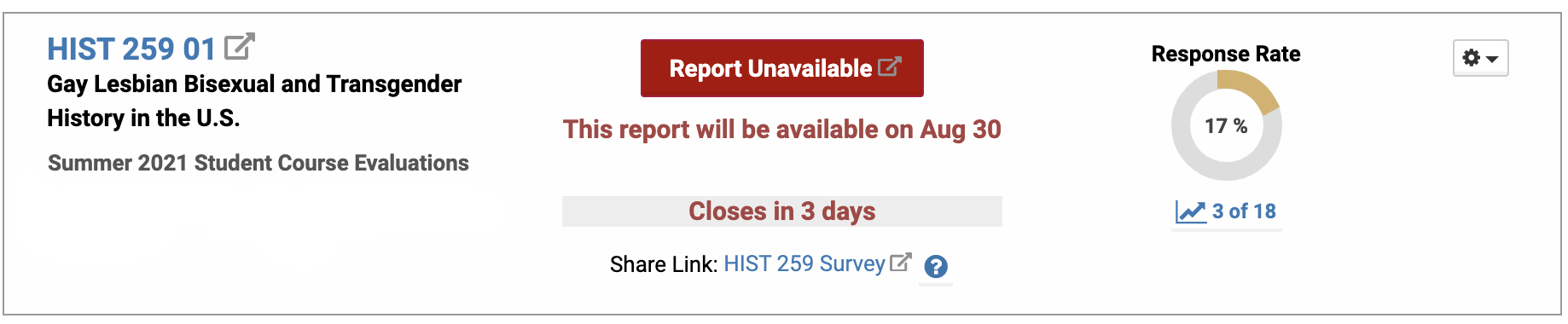
Instructors see how many students completed the evaluation (the response rate) but cannot see who has or has not. Here is an example of what they see:
- Can I send the instructor proof that I completed an evaluation?
Yes. After you complete the evaluation, there is a link you can click that sends an email to your instructor letting them know you completed your evaluation. Here is a detailed guide: Student Course Evaluation - Send Proof of Completion

- Can I edit an evaluation I submitted?
Yes, but you must do so before the evaluation deadline. Here is a guide to editing an evaluation: Student Course Evaluation - Edit Your Submitted Evaluation

- I completed my course evaluations; why am I still getting email reminders?
There are two buttons at the end of an evaluation. One will Save the evaluation so you can return and work on it. The other will Submit the evaluation. If you completed an evaluation but are still getting a reminder about it, you likely clicked the save button, not the submit button. Re-open the evaluation and be sure to click Submit.
- Why do the evaluations close before the final week of classes?
Student course evaluations are open during weeks 12-14 of the semester. That period was selected based on years of feedback from faculty and students. At that point in the semester, students can rate their courses based on the quality of instruction, their learning, and the feedback they received during the semester and avoid reacting to satisfaction with their final grade. Students' ratings of their courses rarely vary much from the middle of the semester through the end of the semester. Additionally, students have said that the last week of the semester is a hectic time for them, particularly with finals.
- Are course evaluations anonymous?The evaluations are designed to be as anonymous as possible. Faculty get a report after the final grade deadline that merges all responses. Scores for each question are averaged, and comments are included unattributed, in random order. If you write feedback with specific details, your instructor might figure out you wrote it, but they would not know how you scored each question.
FACULTY
- Can I add course specific questions to an evaluation?
Yes, but you must add them before the evaluations open to the students. You can select up to 3 additional questions per course. Step-by-step Directions for Adding Questions to Student Course Evaluations
- How do students know when and how to complete their evaluations?
Students are sent emails when evaluations open with directions about how to complete them. If they need assistance, they can respond directly to the email. Regular reminders are sent until the deadline to students who still need to complete their evaluations. You can also give your students this link, where they will see a complete list of all the evaluations they still need to complete: https://p9.courseval.net/etw/ets/et.asp?nxappid=922&nxmid=start
- How do I know a student has completed an evaluation?
To preserve anonymity, you can only see the total number of students who have completed an evaluation, but students can send you proof of their completion through the system. You receive an automated email for each student. If you ask students to send you proof, give them this guide: Student Course Evaluation - Send Proof of Completion
- My department provides evaluations; do my students need to complete the college-wide evaluations?
Yes. College-wide student course evaluations are required for all courses; however, departments may augment them with department-specific evaluations.
- Can a student who never attended evaluate a course?
Every effort is made to verify the accuracy of course rosters to ensure that students are evaluating the correct courses and instructors. Please email course_evaluation@colum.edu if you believe a student is listed by mistake.
In rare cases, a student who has never attended may still be listed. To uphold the validity of evaluations, the student may be removed, but will be reinstated if the student contests that they attended the course. Removals will not be granted for other factors such as poor attendance, poor class participation, or poor quality of work.
- When are course evaluation reports published?
Reports are published after the final grade deadline has passed. Specific dates can be found on the Student Course Evaluation main page. You will receive an email notification when they have been published.
- Where do I find my reports?
Course evaluation reports are available in the Anthology Course Evaluations system. Click here to log in. For additional information, click on Evaluation Reports on the main page.
- I do not see a report for one of my courses; why is that?
There are a few possible reasons:
- You taught in multiple departments but only see reports for courses in one department. Look for the Department drop-down menu near the top of the page. Click the menu and select "Show All."
- Your course is an independent study, directed study, written thesis, or other course type not evaluated under the current student course evaluation process.
- No students completed the evaluation, so there is no report.
- The response rate for my course was low; how can I encourage students to respond?
The best way to encourage students to complete evaluations is to demonstrate that you value their feedback. Discuss with your students how you have improved your courses in the past based on student feedback.
Dedicate time in class to complete evaluations. Evaluations are mobile responsive and can be completed on a smartphone or tablet.
Another option is to ask students to complete a brief mid-semester survey and explain how you plan to adjust the rest of the course based on their responses. Allow the class to discuss contradictions in their feedback (for example, some suggest more small-group discussion while others suggest less).
- As an administrator, how do I access evaluation reports?
You also access reports in Anthology Course Evaluations. Here is a guide: View evaluation reports for courses you coordinate, all courses within a department, or courses in several departments
There are two levels of access:
Department administrators can view reports for all courses and faculty associated with a department. This is the default access given to department chairs.
Course administrators can view specific course evaluation reports. This access must be added every semester. Access can be granted to several individuals in bulk by sending an Excel file with the following columns: (1) Semester, (2) Course Number, (3) Section Number, and (4) MyColumbia ID number. Click here for a template.
Requests for department and course administrator access must be approved by the chair and emailed to course_evaluation@colum.edu.